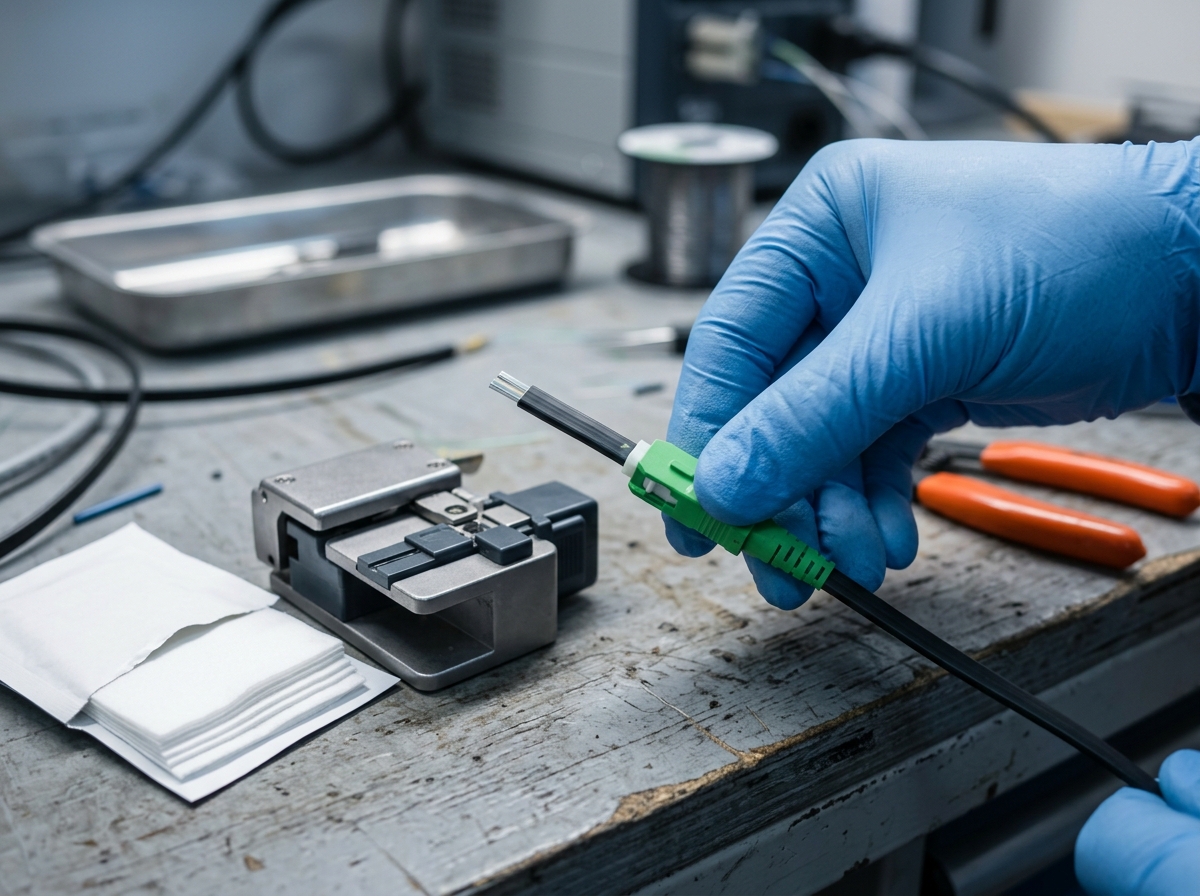
FTTR vs Mesh Wi-Fi: Complete Comparison
This comparison is written by TTI Fiber, which manufactures FTTR optical equipment — fiber drop cables, PLC splitters, and room ONTs. That means we have a horse in this race, so here is the honest framing up front: mesh Wi-Fi genuinely wins in several common situations, and we will tell you exactly which ones.
FTTR vs mesh Wi-Fi is not a question about Wi-Fi. It is a question about backhaul — the connection that carries data between rooms. Mesh Wi-Fi optimizes the wireless layer: more radios, better roaming, one network name. FTTR (Fiber to the Room) removes the wireless bottleneck entirely by running optical fiber from a central master gateway to an ONT in every room, where a compact Wi-Fi access point serves that room at full line rate. For a gigabit or multi-gigabit line in a house with walls, floors, or more than a handful of simultaneous users, FTTR delivers per-room performance that no wireless mesh can match. For a sub-gigabit line, a small or open-plan home, a rental, or a tight budget, mesh Wi-Fi is still the rational choice. Everything below exists to help you figure out which bucket you are in.
At a Glance: FTTR vs Mesh Wi-Fi
Dimension | Mesh Wi-Fi | FTTR (Fiber to the Room) |
|---|---|---|
Backhaul | Wireless (dedicated radio band or shared airtime); optional Ethernet on some systems | Optical fiber to every room — dedicated, full line rate |
Per-room speed | 60–80% of line rate through one wall; degrades with each hop | 900 Mbps+ in every room on a gigabit line |
Coverage model | Satellite nodes spread signal; dead zones shrink but hops cost throughput | Fiber to every room; each room gets its own AP |
Installation | Unbox, plug in, app setup — no drilling | Professional install; transparent micro drop cable along baseboards |
Cost | €150–250 or $139–600 one-time hardware | €500–800 installed (Europe avg.) or ISP-subsidized monthly |
Best for | Retrofit, rental, budget, sub-gigabit lines | Gigabit whole-home coverage, new builds, high device density |
The Real Difference: It's About Backhaul, Not Wi-Fi
Every network in a house has the same shape: one internet connection at the entry point, and a distribution problem between that point and every device. The technology that solves the distribution problem is the backhaul, and it comes in three families.
Wireless mesh backhaul. In a mesh system, satellite nodes talk to the main router over the air. That works beautifully for convenience — no cables, no drilling — but the wireless backhaul shares the same spectrum as your devices. Every hop a packet takes through a node costs throughput and latency, and walls attenuate the signal before it even reaches the next node. A 5 GHz signal loses 30–50% of its throughput through a single interior wall; through two walls, a gigabit connection at the gateway commonly becomes 150–300 Mbps in the far bedroom. The mesh vendors' own guidance confirms the physics: coverage scales by adding nodes, but per-node throughput does not.
Ethernet backhaul. Some mesh systems let you wire nodes together with Cat6, which restores most of the throughput. But Ethernet is a copper cable run — which means drilling, cable management, and a practical limit on how many rooms you can reach without turning the house into a wiring project.
Fiber backhaul (FTTR). FTTR replaces the in-premises distribution layer with optical fiber: a master ONT at the entry point, a PLC splitter, and a thin drop cable to each room, terminated at a room ONT that provides Wi-Fi and a gigabit Ethernet port. Fiber has essentially zero attenuation over in-home distances and is immune to electromagnetic interference — so every room gets the full line rate, not whatever survives the walls. This is the same PON architecture your ISP already uses in the outside plant, standardized by the ITU-T (GPON/G.984 series), scaled down to indoor distances.
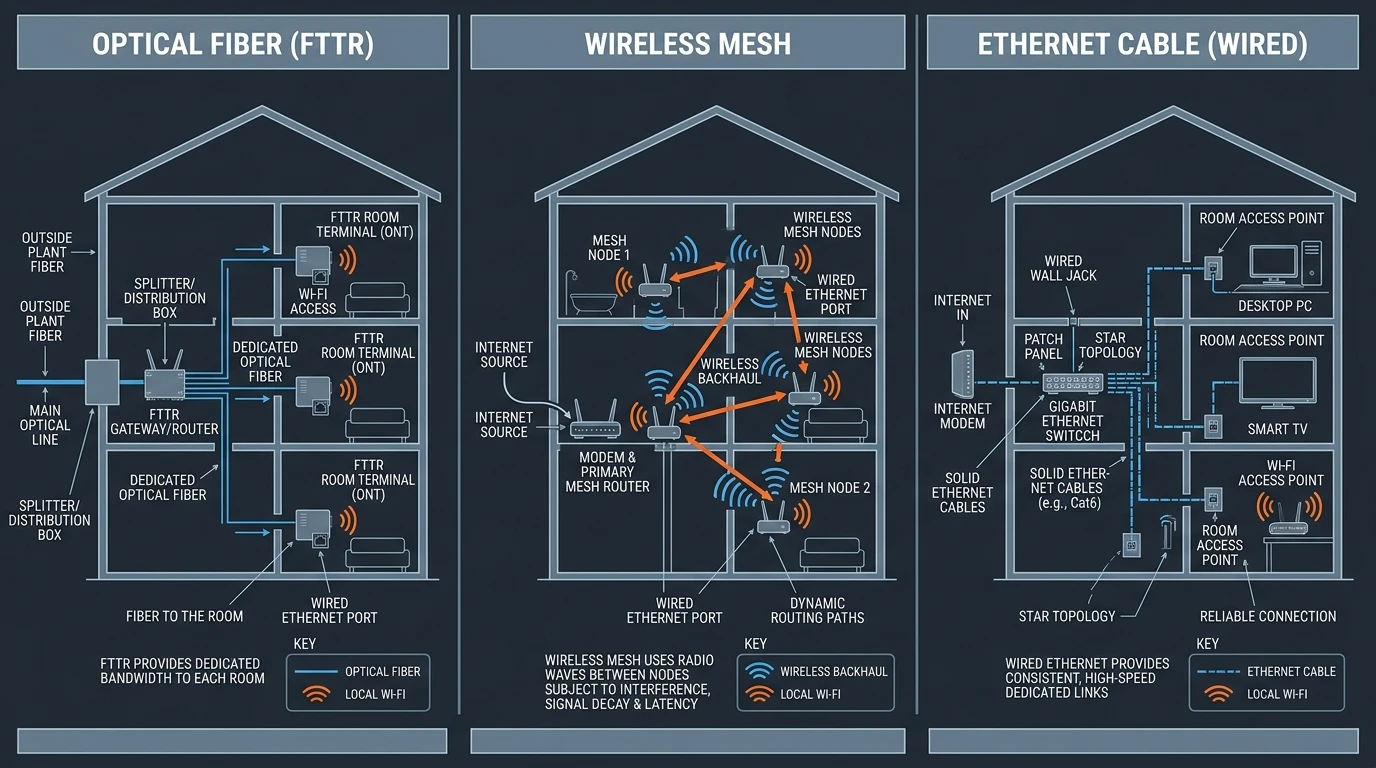
Backhaul is the real difference: FTTR gives every room a dedicated optical pipe; mesh shares the airwaves.
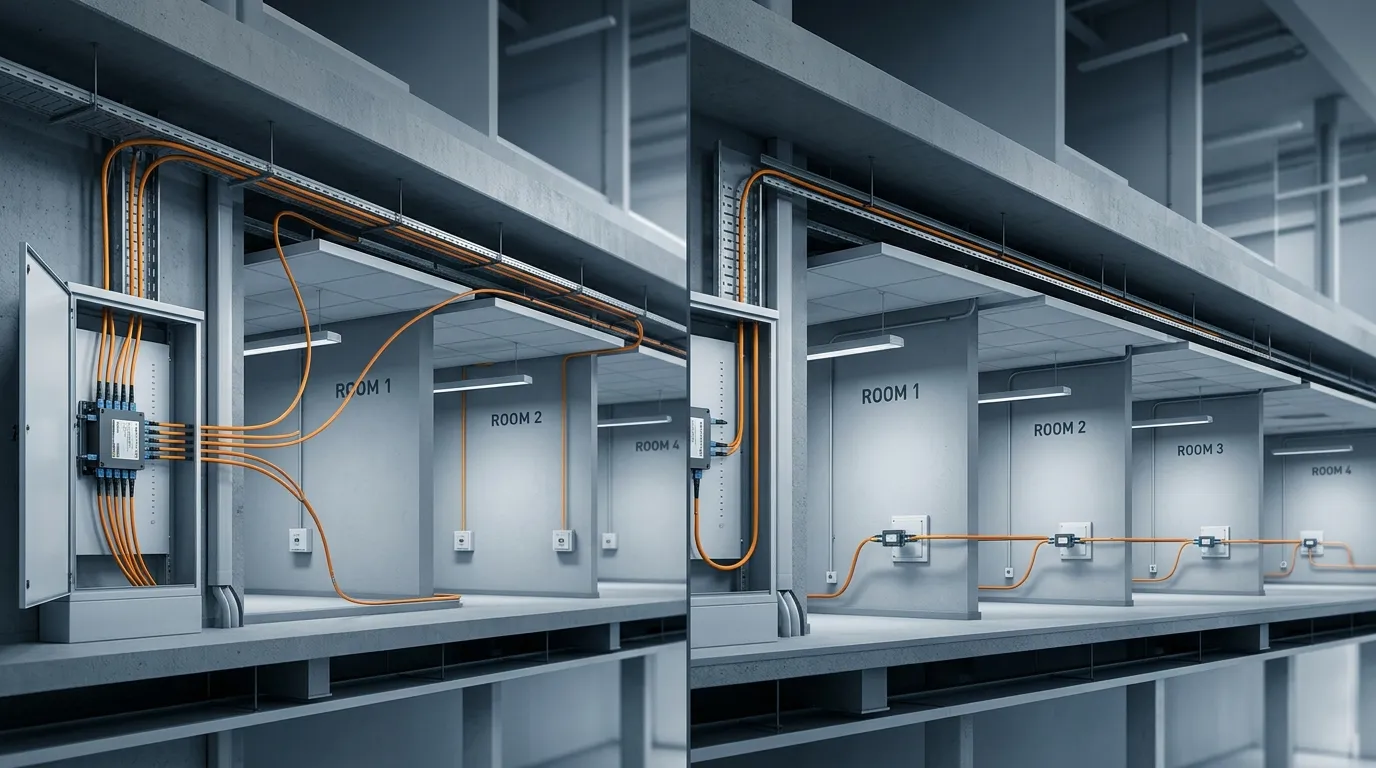
Zooming into the FTTR side, the in-premises network mirrors the PON architecture your ISP already runs in the outside plant — just scaled to indoor distances:
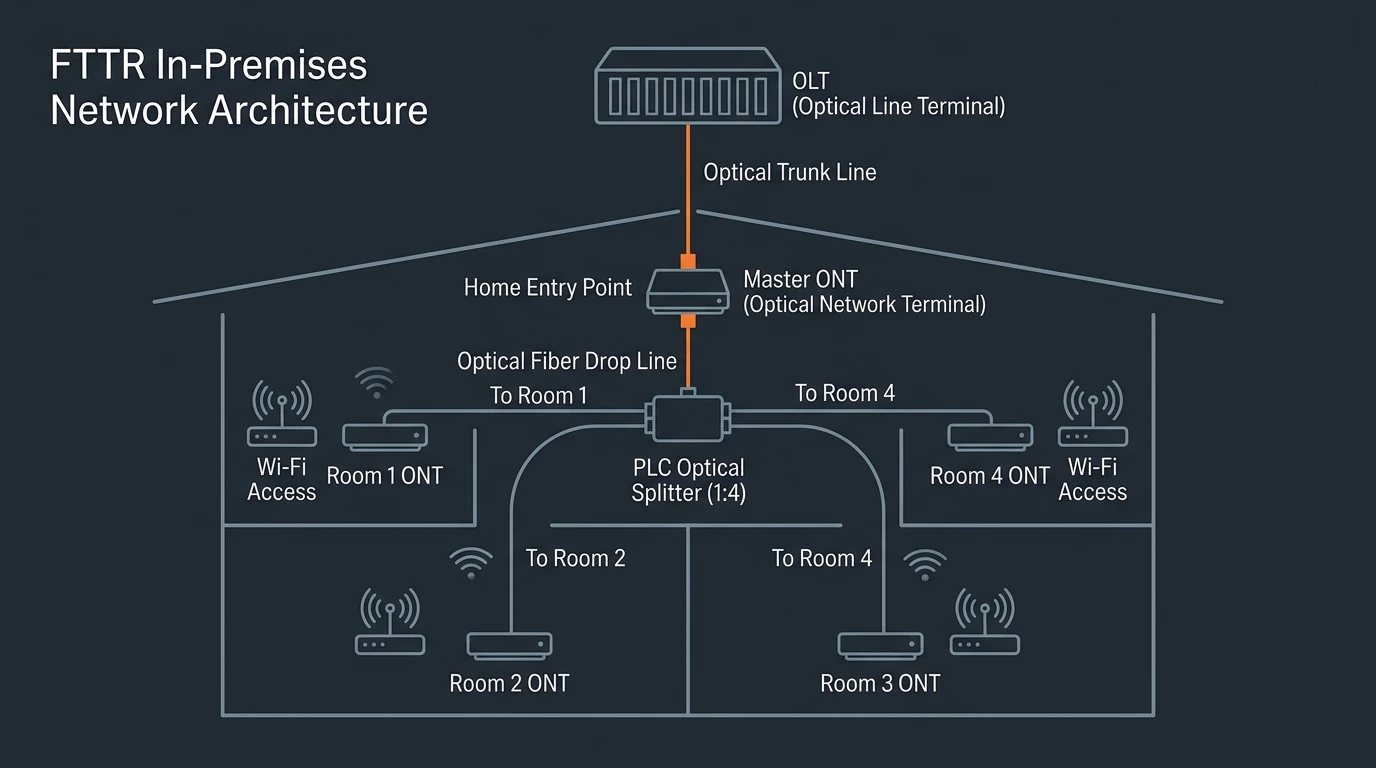
An FTTR network in one diagram: fiber from the entry point to a splitter, then a dedicated drop to each room's ONT.
That one architectural choice explains almost every other difference in this comparison — speed, coverage, capacity, even cost. If you want the full mechanics of how an FTTR network is built (master ONT, splitters, drop cables, wall outlets), our FTTR (Fiber to the Room) overview walks through the architecture and components in detail.
Speed and Performance: What You Actually Get in Each Room
Per-room throughput is where the two architectures diverge most. On a gigabit fiber line:
- Mesh Wi-Fi: the gateway node can hit the line rate, but every downstream node is limited by the wireless backhaul link, wall attenuation, and competing client traffic. Published field measurements of a 200 m² apartment show mesh delivering 200–400 Mbps in the rooms that matter, with throughput varying by position and time of day (ftthfiberoptic field data).
- FTTR: the same apartment with fiber to each room measured 900 Mbps+ in every room, consistently — because each room's ONT connects to the splitter over fiber, not through walls.
The gap widens with simultaneous users. A household streaming 4K in the living room, gaming in the bedroom, and running a video call in the office does not need one fast connection — it needs three fast connections at once. Mesh shares one pool of airtime among all of them; FTTR gives each room its own link.
Latency follows the same pattern. Optical backhaul removes the wireless hop, and field measurements report 30–50% lower latency for FTTR than wireless mesh in real deployments — the difference you feel in cloud gaming, large file transfers, and multi-user video conferencing.
To be fair, the downsides of mesh Wi-Fi deserve a systematic list, because they are the entire reason FTTR exists: wireless backhaul shares airtime with client traffic (a busy node carrying a 4K stream slows the hop for everyone behind it); throughput decays with hops and walls (each mesh hop costs real bandwidth — the 200–400 Mbps-per-room field figure above is measured, not theoretical); performance is position-dependent (the node's placement, not the plan, decides the speed you get in each room); frequent node replacement as Wi-Fi generations turn (Wi-Fi 6 kits are already being displaced by Wi-Fi 7); and no per-room guarantee — mesh optimizes the average, not the worst room. None of these make mesh bad; they make it a shared-resource model, which is exactly what a per-room fiber model is not.
Coverage, Roaming, and Device Capacity
Dead zones. Both systems eliminate dead zones, but differently. Mesh places wireless nodes where the signal is weak — which extends coverage but adds hops. FTTR places a wired access point in every room, so there is no "weak spot" to begin with. For a single-story open-plan apartment under 100 m², the difference is marginal; for a two-story house, a long ranch layout, or concrete construction, FTTR's per-room APs remove the coverage problem at the root.
Roaming. Both use a single network name with seamless handoff between access points. Mesh systems follow the Wi-Fi Alliance EasyMesh standard to coordinate nodes, and FTTR room APs do the same — the practical difference is that an FTTR roaming handoff moves you between full-rate links, while a mesh handoff can move you onto a weaker wireless backhaul link.
Device capacity. The modern household is a dense IoT deployment: smart locks, cameras, lighting, HVAC, TVs, tablets, laptops. Mesh systems are designed for tens of devices and start to feel the strain past 30–50 active clients. FTTR deployments routinely run 100+ devices — field examples include luxury apartments in Shenzhen running 150+ IoT devices across rooms without contention. If your device count is climbing every year, capacity is a forward-looking argument for fiber.
Installation and Aesthetics: Drill vs Plug In
This is where mesh Wi-Fi wins on convenience, and we are not going to pretend otherwise.
Mesh: unbox three nodes, plug them in, run the app, and you have whole-home coverage in twenty minutes. No tools, no landlord permission, no mess. That is a genuinely better experience for anyone who cannot or should not modify the property — which is also why the "wifi extender vs mesh" question usually resolves in mesh's favor for renters; a mesh system is a step up from extenders (which split bandwidth and create separate network names), at a similar price and zero install effort.
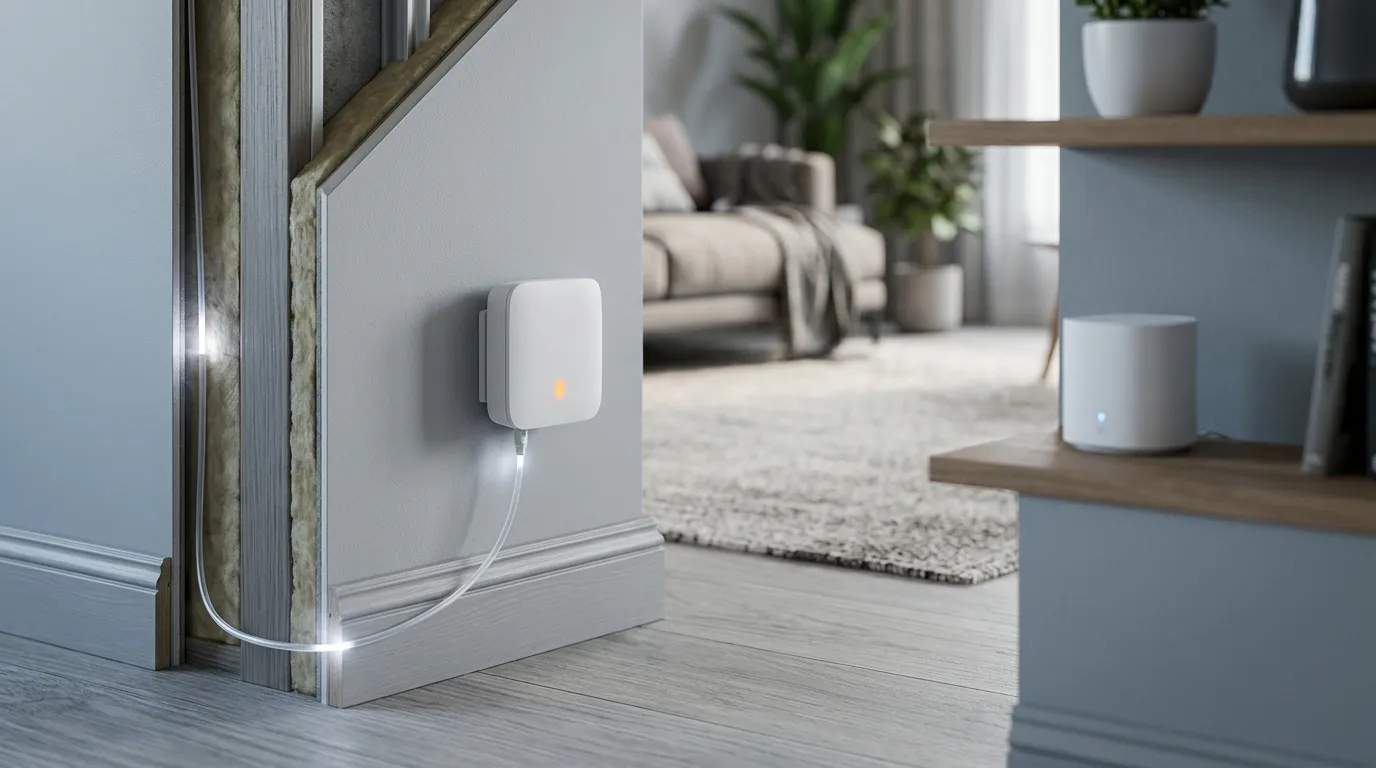
FTTR: requires a professional install. The installer mounts the master ONT at the fiber entry point, routes a transparent micro drop cable (1–2 mm, G.657.B3 bend-insensitive fiber) along baseboards and doorframes, and terminates a wall outlet or room ONT in each target room — typically one to two hours per room. The payoff is invisible: the micro cable is designed to disappear against the trim, and there are no power adapters and no plastic nodes on shelves. For a new build or a renovation, fiber routing happens during construction and the cost premium nearly vanishes. For a finished home, the retrofit is the real cost — which is exactly the trade-off the cost section quantifies.
If indoor fiber deployment for offices or MDUs is your context, the fiber to the desk (FTTD) guide covers the same trade-offs on the commercial side.
Cost Comparison: FTTR vs Mesh Wi-Fi
Cost is the question everyone actually means by "fttr vs mesh wifi" — and it is the question the top search results avoid answering with numbers. Here is the honest breakdown, as of August 2026 (pricing varies by region and ISP):
Cost component | Mesh Wi-Fi | FTTR |
|---|---|---|
Hardware, one-time | $139.99–$599.99 (e.g., eero 6+ 3-pack to eero Max 7) | Master ONT + room ONTs + splitters + drop cable (usually ISP-supplied) |
Installation | None (self-setup) | €500–800 installed, Europe average; less in new builds |
Monthly | None (your ISP plan) | Often ISP-subsidized (e.g., CelcomDigi bundles FTTR with a gigabit plan for RM49/month) |
Replacement cycle | Replace nodes every 4–5 years as Wi-Fi generations turn | Fiber is 30-year infrastructure; swap ONTs to upgrade Wi-Fi generations |
The decision-relevant math: mesh is a one-time $150–600 purchase that you will repeat every few years; FTTR is a larger first cost that is frequently absorbed or subsidized by the ISP in exchange for a premium plan, and the fiber itself does not age. Industry reporting puts the typical European FTTR install at €500–800 versus €150–250 for mesh hardware (field-cost data from ftthfiberoptic.com). In China, where FTTR is integrated into new apartment construction, the marginal cost is far lower — which is one reason adoption passed 10 million households by mid-2024 (GSMA Intelligence's FTTR industry analysis).
So the honest cost verdict: mesh is cheaper today and will need replacing sooner; FTTR is more expensive to install and cheaper across the life of a gigabit+ service.
When to Choose Mesh Wi-Fi
Mesh is the right answer — not a compromise — in these situations:
- You rent and cannot drill, route cables, or permanently modify the property.
- Your line is below gigabit (e.g., 300–500 Mbps). Mesh is not the bottleneck at those speeds, and FTTR's per-room line rate buys you nothing you can use.
- Your home is small or open-plan (under ~100 m² with few interior walls). One good mesh kit covers it.
- You need it working today — mesh is a 20-minute self-install; FTTR is a scheduled professional visit.
- Your budget is a few hundred dollars, one-time. Mesh hardware is a fraction of an installed FTTR system.
- You move often. A mesh kit packs into a box; fiber does not.
If you are also weighing a single traditional router or a Wi-Fi extender against mesh, the practical rule is that mesh wins on coverage and simplicity, a single router wins on price, and an extender only makes sense as a stopgap — the sizing math depends on your line rate more than anything else.
When to Choose FTTR — and Its Honest Limitations
FTTR earns its cost when the following are true:
- Your line is gigabit or faster, and you want to actually use it in every room.
- Your home is 150 m²+ or multi-story, or has concrete/plaster walls that eat Wi-Fi.
- You have high device density (30+ clients, growing) or latency-sensitive workloads (gaming, cloud VR, 4K/8K streaming, home office video).
- You are building or renovating — fiber in the walls during construction is the cheapest possible deployment.
- You want a 10+ year infrastructure answer instead of a 4–5 year gadget cycle.
And the honest limitations — because FTTR is not a universal upgrade:
- Cost premium. Equipment and professional installation cost more than a mesh kit, especially in retrofit.
- ISP dependency. FTTR is typically an operator product (like the CelcomDigi FTTR bundle or Huawei's FTTR home solutions). If your ISP does not offer it, you cannot just buy it off the shelf — although integrators increasingly install vendor kits directly.
- Retrofit friction. Finished homes require careful micro-cable routing; not every house has accessible baseboards or conduit paths.
- Overkill below gigabit. On a 500 Mbps line, mesh reaches the same practical speeds at a fraction of the cost.
- Vendor ecosystem maturity in the US. FTTR is mainstream in China and rolling out across Europe and Asia; US availability is thinner (see below).
For the upstream context — how FTTR fits alongside FTTH, FTTB, and FTTD in the FTTx family — see our FTTx architecture comparison, and for multi-dwelling buildings specifically, what FTTB is and how it works.
Does Wi-Fi 7 Mesh Change the Answer?
This is the question the top community thread on this topic keeps circling: with Wi-Fi 7 mesh kits shipping, does the wireless case close the gap with FTTR? The most-upvoted r/wifi thread on "fttr vs mesh wifi reddit" is a live example — a homeowner choosing between a Huawei F30 FTTR system and a Wi-Fi 7 mesh kit, with no satisfying answer anywhere in the thread. The searches for "fttr vs mesh wifi vs router" surface the same decision from the third angle: whether a single high-end router can still hold the line.
Wi-Fi 7 (802.11be) is a real step forward. It adds 320 MHz channels, multi-link operation (MLO), and lower latency — a Wi-Fi 7 mesh node can move more data over the air than Wi-Fi 6, and per-node throughput is genuinely higher. If you measure "what does one node do at close range," Wi-Fi 7 mesh narrows the gap substantially.
But Wi-Fi 7 does not change the backhaul physics. The wireless link between mesh nodes still shares spectrum with client traffic, still attenuates through walls, and still costs throughput per hop. A Wi-Fi 7 mesh node in the far bedroom is only as good as the Wi-Fi 7 link between it and the next node — through the same walls. FTTR answers this by making the inter-room link fiber, and the room APs in modern FTTR systems also ship with Wi-Fi 6/7 radios. The radio generation converges on both sides; the backhaul difference does not. The one case where Wi-Fi 7 mesh genuinely closes the gap is sub-gigabit service, where the line — not the backhaul — is the ceiling.
The Hybrid Answer: FTTR + Mesh Together
Integrators and ISPs rarely frame this as either/or in practice. The professional deployment pattern is:
- FTTR optical backbone to the rooms that matter — the office, the living room, the gaming room, anywhere throughput and latency are load-bearing.
- Mesh nodes for the periphery — outbuildings, garages, yards, or rooms where a full fiber drop is not worth the install cost.
This hybrid gives the guaranteed performance where it is needed and the convenience of wireless everywhere else, at a cost between the two extremes. It is also the honest answer for anyone who wants FTTR-grade reliability in a home office without fibering the entire house. If your line rate and budget are the deciding factors, our home and office fiber speed guide helps you establish what you actually need before you design the topology.
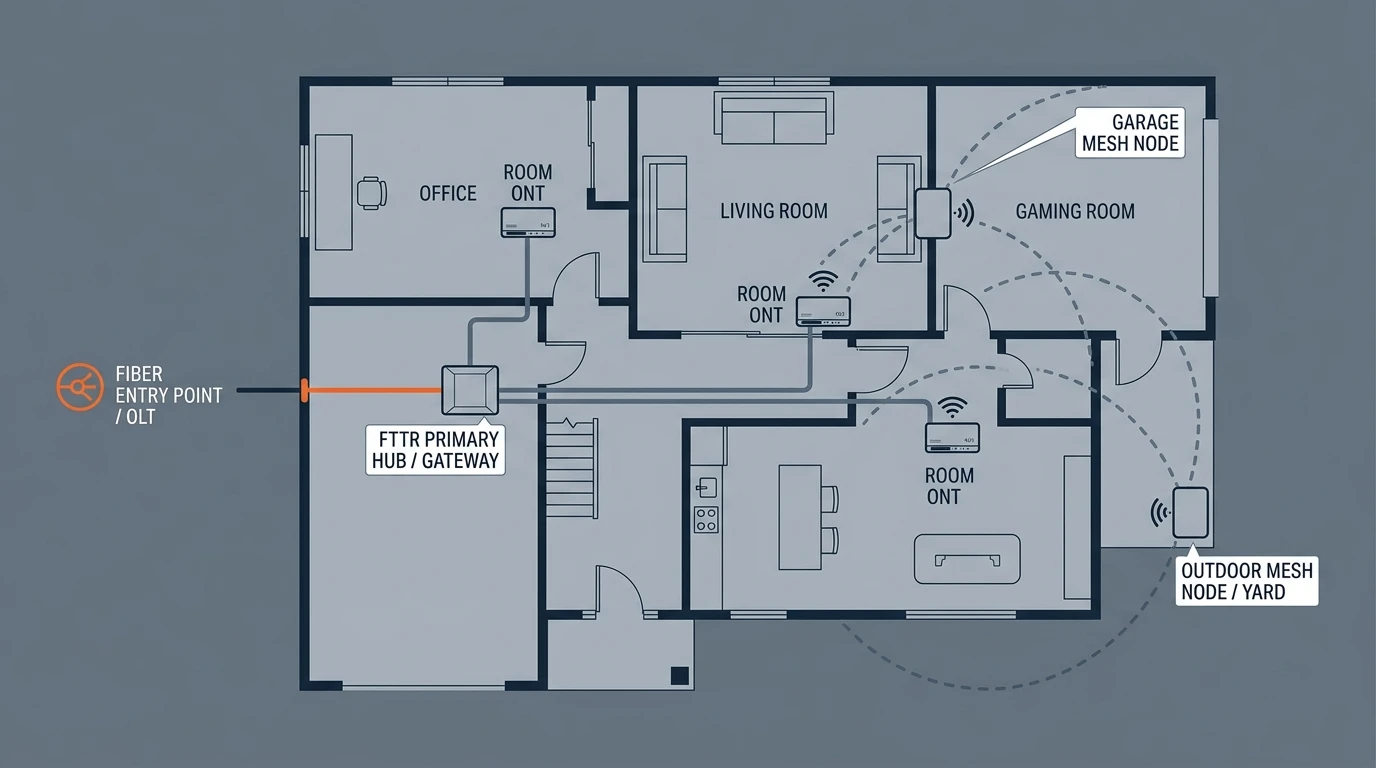
The hybrid pattern: fiber backbone where performance matters, mesh nodes where convenience wins.
FTTR Availability: Can You Even Get It?
Availability decides the comparison faster than any technical argument, so here is the honest picture, as of August 2026:
- China: FTTR is the mainstream premium home product — more than 10 million households installed by mid-2024, driven by new-build integration and operator bundles (GSMA Intelligence).
- Europe and SE Asia: active operator rollouts — CelcomDigi in Malaysia markets FTTR bundles aggressively, and operators in France, Germany, and Greece have begun small-scale deployments aimed at remote workers and high-density apartments.
- United States: thinner, but emerging. Major ISPs have been trialing FTTR as a premium whole-home add-on, and the vendor ecosystem (Huawei, ZTE, and Chinese ODM suppliers like TTI Fiber) supplies equipment globally. There is no honest way to claim broad US availability today — the practical move is to ask your ISP directly whether they offer a "fiber to the room" or FTTR upgrade tier, and if they do not, ask whether their install team can run an indoor fiber drop on request.
For integrators and ISPs evaluating deployment, the FTTH/FTTx solutions overview on our main site covers the network-side picture — OLTs, splitters, and drop cable portfolios for access networks.
Bottom Line: Which Should You Choose?
Run your situation through this checklist:
- Line rate: below ~500 Mbps → mesh is fine; you will not notice the difference.
- Property: rental, small, or open-plan → mesh. Owned, 150 m²+, multi-story, or thick walls → FTTR earns its cost.
- Budget and timeline: need coverage this weekend on a few hundred dollars → mesh. Planning a build or renovation → put fiber in the walls.
- Device density and workloads: 30+ clients, gaming, streaming, home office → FTTR's per-room links and capacity headroom win.
The honest verdict is bidirectional. Mesh Wi-Fi is the right choice for retrofit, rental, budget, and sub-gigabit situations — it is cheap, instant, and good enough. FTTR is the right choice for gigabit whole-home performance, new builds and renovations, and households that have outgrown wireless — it costs more to install, but every room gets the full line rate and the fiber will outlast three generations of mesh hardware. Both are legitimate answers; they are answers to different houses.
Building, renovating, or planning a whole-home network? See how FTTR fiber to the room is deployed — start with our FTTR drop cable and splitter product lines and the components behind a fiber-to-every-room deployment.