Single Mode vs Multimode Fiber: Full Comparison | TTI Fiber

Single Mode vs Multimode Fiber: The Complete Comparison
Almost every "single mode vs multimode" guide opens by asking which one is better. That's the wrong question — they're not competing for the same job. The real decision is a crossover: below a few hundred meters, multimode is usually the cheaper way to move data; past that, single mode is the only way that reaches at all. Get the crossover point right and the choice makes itself.
The trouble is that most comparisons quote distance and cost numbers that contradict each other — "multimode reaches 550 meters" on one page, "2 kilometers" on the next; "single mode costs more" with no explanation of what costs more. This guide fixes that. Everything traces back to a single physical difference — the core — and once you see how that one dimension drives modes, dispersion, distance, and cost, the spec tables stop looking like trivia and start reading like a decision.
Single Mode vs Multimode at a Glance
Here's the short version before the deep dive.
Single Mode (SMF) | Multimode (MMF) | |
|---|---|---|
Core diameter | 9 µm (one light path) | 50 µm or 62.5 µm (many paths) |
Cladding diameter | 125 µm | 125 µm (identical) |
Grades | OS1 (indoor), OS2 (outdoor) | OM1, OM2, OM3, OM4, OM5 |
Light source | Laser (DFB/FP), 1310 / 1550 nm | LED or VCSEL, 850 / 1300 nm |
Typical reach | 10 km to 100+ km | 100 m to 550 m (speed-dependent) |
Bandwidth | Effectively unlimited over these distances | Limited by modal dispersion |
Jacket color (TIA-598-C) | Yellow | Orange (OM1/2), Aqua (OM3/4), Lime green (OM5) |
Cable cost | Comparable (small margin) | Comparable (small margin) |
Transceiver cost | Higher (laser optics) | Lower (VCSEL optics) |
Best fit | FTTH, long-haul, campus backbone, DCI | In-row data center, LAN, short backbone |
The one line that explains the whole table: single mode has a tiny core that admits one light path; multimode has a wide core that admits many. Every other difference — reach, bandwidth, which transceiver you bolt on, even the jacket color — is a downstream consequence of that. So start there.
The One Difference Everything Flows From: Core Size
Single-mode and multimode fiber look identical from the outside. Both are a glass core wrapped in glass cladding with a 125 µm outer diameter — the "125" in 9/125 and 50/125. The difference is the number before the slash: the core, the light-carrying center.
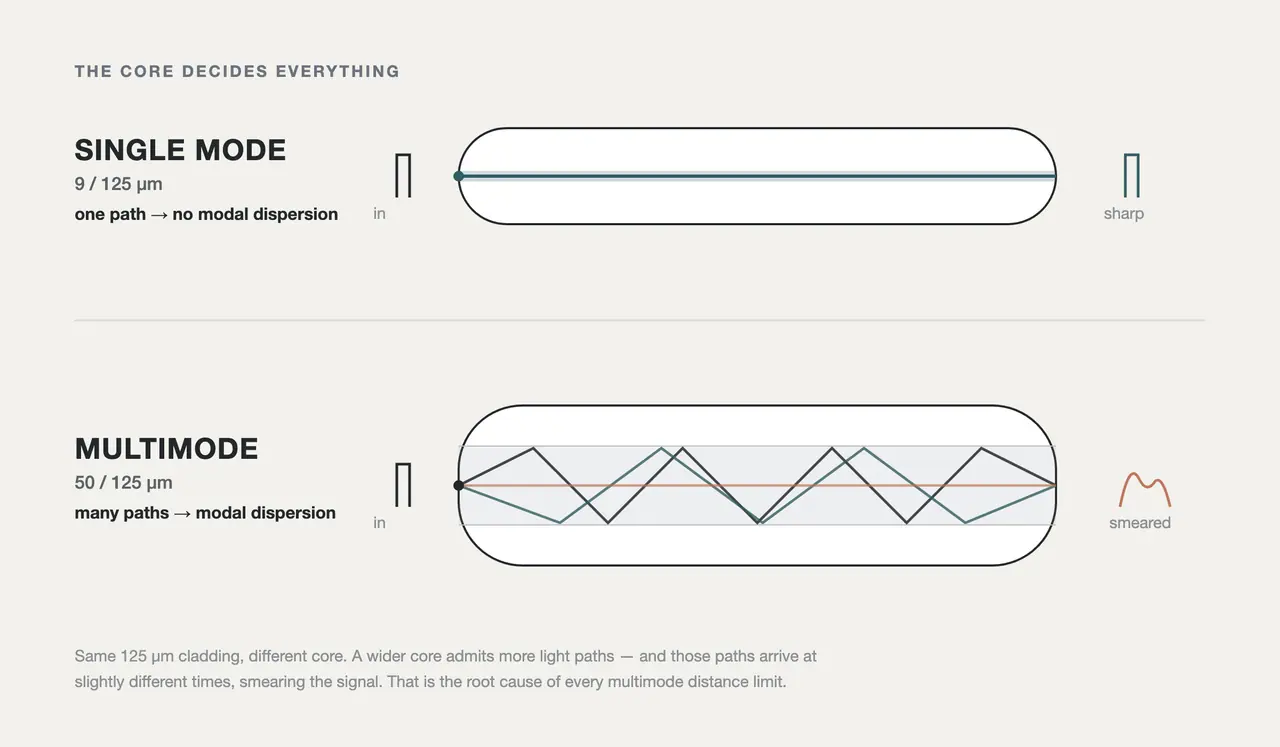
The core diameter decides everything: single mode's 9 µm core admits a single light path; multimode's 50/62.5 µm core admits many, and those paths arrive at slightly different times — the root cause of every distance limit that follows.
A single-mode core is about 9 µm across — roughly a tenth the width of a human hair. That's narrow enough that light can travel only one way down the fiber: a single mode, straight down the axis. One path in, one path out, arriving intact.
A multimode core is 50 µm (OM2–OM5) or 62.5 µm (OM1) — five to seven times wider. That extra room lets light enter at many angles and bounce down the fiber along dozens of different paths, or modes, at once. Each mode travels a slightly different physical length, so they arrive at slightly different times. That spreading-out has a name, and it's the villain of this whole story: modal dispersion.
Modal dispersion is why multimode has a distance ceiling and single mode effectively doesn't. Send a clean pulse into multimode fiber and the modes smear it over distance until "on" and "off" blur together and the receiver can't read the bits. The faster the data rate, the shorter the pulses, and the sooner that smear becomes unreadable. Single mode has no modal dispersion at all — with only one path, there's nothing to smear — so it's limited by much gentler effects (attenuation and chromatic dispersion) that let it run tens of kilometers instead of tens of meters.
That's the master chain, and it's worth memorizing because it predicts every spec below:
Bigger core → more modes → more modal dispersion → less bandwidth → shorter reach.
Distance and Speed: The Numbers That Actually Matter
This is where most guides fall apart — they quote a single "max distance" per fiber type as if speed didn't exist. It does. Multimode reach depends entirely on the data rate, because faster signals hit the modal-dispersion wall sooner. Here's the reach each grade actually delivers, by speed:
Fiber | 1 Gbps | 10 Gbps | 40 Gbps | 100 Gbps |
|---|---|---|---|---|
OM1 (62.5 µm) | 275 m | 33 m | — | — |
OM2 (50 µm) | 550 m | 82 m | — | — |
OM3 (50 µm, laser-opt.) | 550 m | 300 m | 100 m | 70 m |
OM4 (50 µm, laser-opt.) | 550 m | 400 m | 150 m | 100 m |
OM5 (50 µm, wideband) | 550 m | 400 m | 150 m | 150 m (SWDM4) |
OS2 single mode | 5–10 km | 10 km | 10 km | 10 km (40–80 km with the right optics) |
Figures are the guaranteed reaches of the matching IEEE 802.3 interface — 1000BASE-SX, 10GBASE-SR, 40GBASE-SR4, 100GBASE-SR4/SWDM4 on multimode; 1000BASE-LX through 100GBASE-LR on single mode. Real installs often go further; these are the numbers you can design to.
Two things jump out. First, multimode's reach collapses as speed climbs — OM4 does 400 m at 10G but only 150 m at 40G and 100 m at 100G. (At 1 Gbps every 50 µm grade tops out at the same 550 m because 1000BASE-SX is capped there, not by the fiber — the grade differences only open up at 10G and above.) Second, single mode barely moves: its reach is set by the transceiver and the fiber's low attenuation, not by the data rate, so 10G and 100G both run 10 km on a standard LR-class optic, and far further with amplified or coherent optics.
The reason single mode keeps going is the second kind of dispersion. Once modal dispersion is off the table, the limiter becomes chromatic dispersion — the slight spreading caused by different wavelengths of light traveling at different speeds — plus plain attenuation (signal loss per kilometer). Both are small: single-mode OS2 loses only about 0.3–0.4 dB/km at 1310 nm and roughly 0.2 dB/km at 1550 nm, versus around 3 dB/km for multimode at 850 nm. Lower loss and gentler dispersion are exactly why single mode owns everything past the multimode ceiling.
If your fight is specifically at the multimode grade level — how far OM4 really goes, whether OM2 still belongs in a design — those deserve their own treatment: see how far OM4 multimode fiber can transmit and whether OM2 is obsolete.
Cost: It's the Transceivers, Not the Glass
"Single mode is more expensive" is repeated everywhere and explained almost nowhere — and as stated, it's misleading. The cable is rarely where the gap lives: multimode's larger, laser-optimized core is more complex to manufacture, so multimode glass isn't automatically the cheaper of the two, and at a given fiber count the two cables often land within a small margin of each other. The lopsided cost difference people actually notice shows up somewhere else.
The real cost gap is at the ends of the fiber — the transceivers.
Cost element | Single Mode | Multimode |
|---|---|---|
Light source | DFB or FP laser (1310/1550 nm) — precise, costlier | VCSEL (850 nm) — cheap to mass-produce |
Typical optic cost | Higher (roughly 1.5–5× at comparable speeds) | Lower |
Alignment tolerance | Tight (9 µm core) — pricier connectors/splices | Looser (50 µm core) — easier, cheaper termination |
Cable (per meter) | Comparable — often within a small margin at the same fiber count | Comparable |
A single-mode transceiver has to launch light into a 9 µm target with a narrow-linewidth laser; a multimode transceiver fires an inexpensive VCSEL (vertical-cavity surface-emitting laser) into a forgiving 50 µm core. That VCSEL-versus-laser difference — not the fiber — is what makes short multimode links cheaper to build. It's also why the "which is cheaper" answer flips with distance: for a rack full of 100-meter links, multimode's cheap optics win on total cost; stretch the same link past multimode's reach ceiling and single mode isn't just cheaper, it's the only option that works. That distance-versus-cost crossover is the actual decision point, and it's why data centers still deploy plenty of multimode even as single-mode optics get cheaper every year.
The Grades: OS1/OS2 and OM1 Through OM5
"Single mode" and "multimode" each split into standardized grades. You'll see these codes on every datasheet.
Single mode — OS1 and OS2 (OS = Optical Single-mode):
- OS1 — tight-buffered construction for indoor use (risers, data-center interconnect within a building). Attenuation up to ~1.0 dB/km.
- OS2 — loose-tube, gel-filled construction for outdoor / long-haul runs (FTTH, backbone, duct and buried routes). Lower attenuation, ~0.4 dB/km or better. Most access and long-haul deployments specify OS2.
Treating "single mode" as one thing is a common mistake — OS1 and OS2 are the same 9 µm glass, but their cable construction targets very different environments. High-fiber-count backbone builds are a good example; see 24-strand single-mode fiber and where it fits.
Multimode — OM1 through OM5 (OM = Optical Multimode):
Grade | Core | Optimized for | Modal bandwidth @850 nm | Jacket |
|---|---|---|---|---|
OM1 | 62.5 µm | LED (legacy) | 200 MHz·km (OFL) | Orange |
OM2 | 50 µm | LED (legacy) | 500 MHz·km (OFL) | Orange |
OM3 | 50 µm | VCSEL (laser-opt.) | 2000 MHz·km (EMB) | Aqua |
OM4 | 50 µm | VCSEL (laser-opt.) | 4700 MHz·km (EMB) | Aqua |
OM5 | 50 µm | VCSEL, wideband (SWDM) | 4700 MHz·km EMB (+2470 @953 nm) | Lime green |
The jump from OM1/OM2 to OM3+ is the whole reason modern multimode performs. OM1 and OM2 were designed around LED light sources and the old 62.5 µm core; OM3, OM4, and OM5 are laser-optimized 50 µm fiber, precision-built to control differential mode delay so a VCSEL can drive them at 10G, 40G, and 100G. That's why an OM4 link outruns an OM1 link by more than 10×. For the grade-by-grade breakdown, see the difference between OM1, OM2, OM3 and OM4 and where OM4 and OM5 fit.
One nuance the bandwidth column hides: OM3/OM4 quote Effective Modal Bandwidth (EMB) — measured with a laser launch — which is higher and more meaningful than the older Overfilled Launch (OFL) figure measured with an LED. When you compare two multimode datasheets, make sure you're comparing EMB to EMB.
Color Coding: What the Jacket Tells You
Fiber jackets follow a color convention (TIA-598-C) so you can identify a cable's type on sight — genuinely useful when you're staring at a patch panel. This is the table people screenshot:
Jacket color | Fiber type |
|---|---|
Yellow | Single mode (OS1 / OS2) |
Orange | Multimode OM1 / OM2 |
Aqua | Multimode OM3 / OM4 |
Lime green | Multimode OM5 |
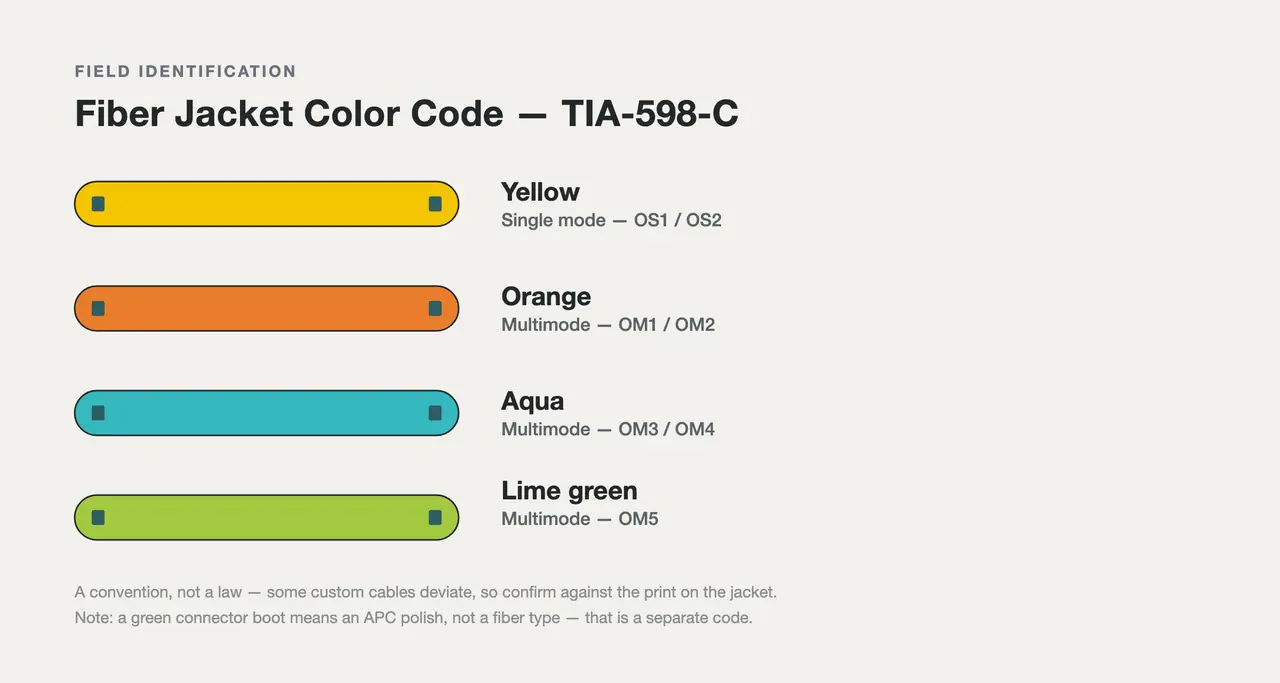
Jacket color is a quick field ID, not a guarantee — always confirm the type on the cable print. Yellow signals single mode; orange, aqua, and lime green signal successive multimode grades.
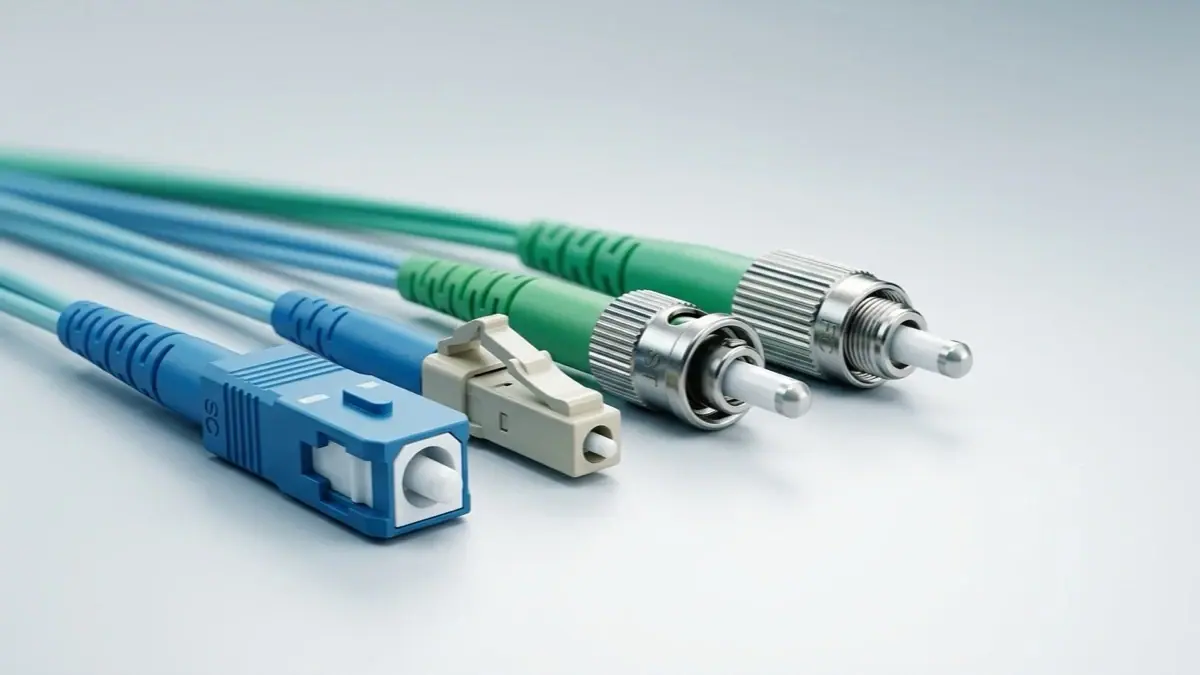
Two cautions. The color code is a convention, not a law — some vendors and custom cables deviate, so confirm against the legend printed on the jacket. And connector color is a separate code: a green connector boot means an APC polish, not a fiber type (more on that next).
Connectors and Compatibility: Can You Mix Them?
Single mode and multimode use the same connector families — LC and SC for duplex links, MPO/MTP for high-density parallel optics in the data center. So a connector will physically mate. That does not mean the link will work.
You cannot mix single-mode and multimode fiber in the same optical path. Splice a 9 µm single-mode core to a 50 µm multimode core and the mode-field mismatch throws away a large fraction of the light — insertion loss so high the link fails or runs far below spec. The connectors fit; the light doesn't. Match fiber type end to end, and match the transceiver to the fiber.
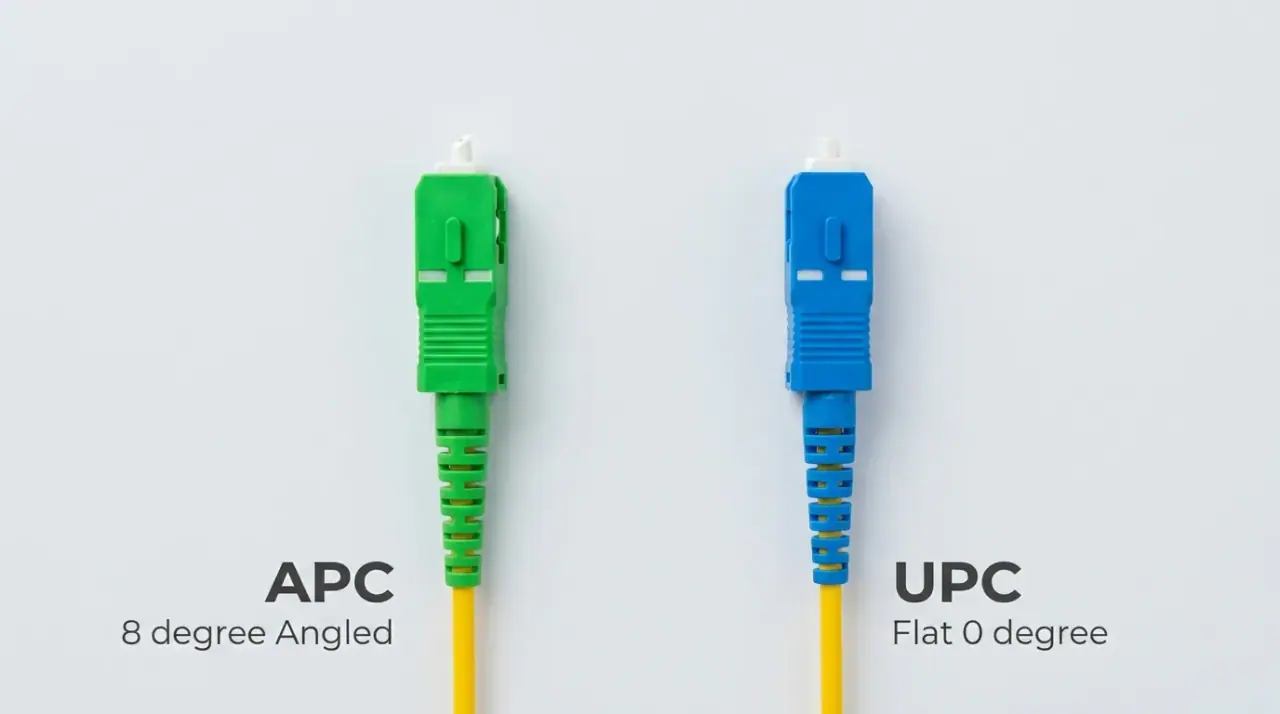
One connector distinction that does track with fiber type in practice is polish. APC (Angled Physical Contact, green boot, 8° angled endface) drives back-reflection far lower than UPC (Ultra Physical Contact, blue boot), which matters most on single-mode links carrying analog video or high-bit-rate signals — so FTTH and many single-mode deployments specify APC, while multimode is almost always UPC. In the data center, parallel single-mode and multimode both lean on MPO/MTP trunks; see MPO/MTP assemblies for how those high-count connectors are built.
When to Use Single Mode vs Multimode: A Decision Framework
Strip away the physics and the choice comes down to matching fiber to deployment. Work down this list:
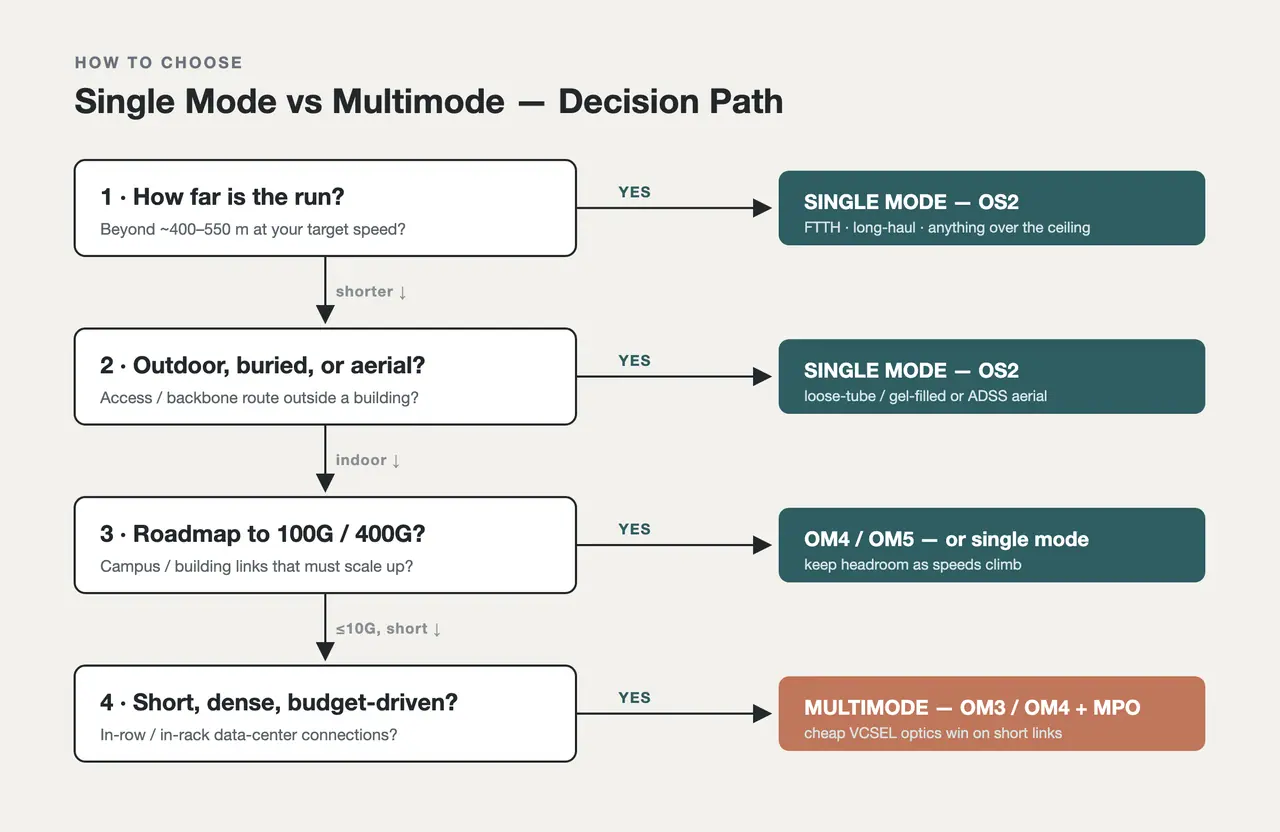
A quick way to choose: distance sets the hard boundary first, then data-rate roadmap, environment, and budget narrow it to a specific grade.
- Start with distance — it's the hard boundary. Any run beyond roughly 400–550 m at modern speeds is single-mode territory; multimode simply won't reach. Under a few hundred meters, both are on the table and cost breaks the tie.
- Then the data-rate roadmap. Building links you'll push to 100G or 400G? Single mode never bottlenecks on distance, and even inside a data center, choose OM4/OM5 over OM3 to keep headroom as speeds climb.
- Indoor or outdoor? Outdoor, buried, or aerial access and backbone runs mean single-mode OS2 in a rugged loose-tube or ADSS aerial construction; indoor structured cabling can be OS1 single mode or OM3/OM4 multimode depending on distance and speed.
- Then budget. For dense, short links (in-row and in-rack data-center connections), multimode's cheaper VCSEL optics win on total cost. Everywhere else, single mode's unlimited-for-your-distances reach — with no modal-dispersion ceiling to design around — makes it the safe long-term bet.
The short version by scenario:
- FTTH / access networks → Single mode (OS2), usually with APC connectors.
- Long-haul / metro / DCI between buildings → Single mode (OS2), 1550 nm, often amplified or coherent.
- Campus / building backbone → Single mode for anything over ~400 m; OM4 multimode for shorter runs.
- In-row / in-rack data center (100G/400G) → Multimode OM4/OM5 with MPO, or increasingly single mode as optics prices fall.
- LAN / horizontal cabling → OM3/OM4 multimode is common and cost-effective at these distances.
Notice how often the outdoor and access answers land on single mode. That's not a coincidence — it's where fiber has to cover real distance, and it's the deployment layer where getting the cable construction right (loose-tube, gel-filled, armored or all-dielectric) matters as much as the fiber grade.
What We See Go Wrong (From the Manufacturing Side)
Building both fiber types for a living, the same few mistakes show up on incoming specs and support tickets far more often than the physics above would predict:
- Mixing types on a patch panel. A yellow single-mode jumper patched into a multimode port is the most common "the link is up but the loss is terrible" ticket we field. The connectors mate perfectly, which is exactly why it slips through — always match the jacket color to the port.
- Over-speccing single mode indoors. Plenty of 90-meter data-center links get built on single mode "to be safe," then pay for DFB optics they never needed. At that distance OM4 with VCSELs is cheaper and does the job.
- Under-speccing multimode against a roadmap. The reverse also happens: OM3 gets installed for a network that's slated to jump to 100G/400G, and its shorter high-speed reach forces a re-pull two years later. If the roadmap is real, OM4/OM5 — or single mode — is the cheaper decision over the life of the cabling.
- Treating "single mode" as one product. OS1 and OS2 are the same 9 µm glass but different cable builds; specifying indoor tight-buffered OS1 for a buried outdoor run (where OS2 loose-tube belongs) is a durability problem waiting to happen.
None of this is exotic — it's just what happens when a spec is written from a datasheet's headline number instead of the deployment. The fiber grades themselves are standardized (multimode and single-mode categories under ISO/IEC 11801 and TIA-568 / TIA-492, Ethernet reaches under IEEE 802.3), so the spec is only as good as the match between those numbers and the actual link.
Quick Answers
Can you connect single mode to multimode fiber? No. The 9 µm and 50 µm cores don't match, so a joint between them loses a large share of the light — the link fails or runs far below spec. The connectors physically mate, but the optical path won't work. Match fiber type, and match the transceiver, end to end.
What is the maximum distance for single mode vs multimode? Multimode ranges from about 33 m (OM1 at 10G) to ~550 m (OM4 at lower speeds), and shrinks as data rate rises. Single mode runs 10 km on a standard LR optic and 40–80 km or more with the right optics — its reach is set by the transceiver, not the data rate.
Why is single mode more expensive than multimode? Usually not the cable — at the same fiber count the two land within a small margin. The gap is in the transceivers: single mode uses precise DFB/FP lasers while multimode uses cheap VCSELs, so single-mode optics run roughly 1.5–5× more at comparable speeds. Over long distances, single mode is still cheaper overall because multimode can't reach at all.
Which is faster, single mode or multimode? Both carry the same data rates (10G, 40G, 100G, 400G) — "faster" really means how far they sustain that rate. Single mode sustains high speeds over kilometers; multimode sustains them only over shorter distances before modal dispersion limits it.
What do OS and OM mean? OS = Optical Single-mode (OS1 indoor, OS2 outdoor/long-haul). OM = Optical Multimode (OM1 through OM5, increasing bandwidth and reach). They're the standardized performance grades within each fiber type.
What do the jacket colors mean? Under TIA-598-C: yellow = single mode; orange = OM1/OM2 multimode; aqua = OM3/OM4 multimode; lime green = OM5. It's a convention, so confirm against the print on the cable.
Where TTI Fiber Fits
Single mode vs multimode isn't a contest — it's a match between distance, speed, environment, and budget on one side and the right fiber on the other. Get the crossover point right and the rest of the spec sheet falls into place.
TTI Fiber manufactures both sides of that decision: single-mode OS2 patch cords and OM3/OM4 multimode assemblies, plus the indoor and outdoor cable — including single-mode OS2 loose-tube and ADSS aerial constructions — that access and backbone routes depend on. If you already know your distance, speed, and environment, browse the lineups above for specific grades, connectors, and fiber counts. If you're still working through the crossover, send us your link details — distance, target speed, indoor or outdoor — and our engineers will recommend a specific fiber type and construction within 24 hours.